- Home Page /
- Electronics /
- Car & Vehicle Electronics /
- Vehicle Electronics Accessories /
- Audio & Video Accessories /
- Auxiliary Input Adapters /
- Carlinkit Wireless CarPlay USB Adapter Only C...
0 ratings




Item #:
51179036
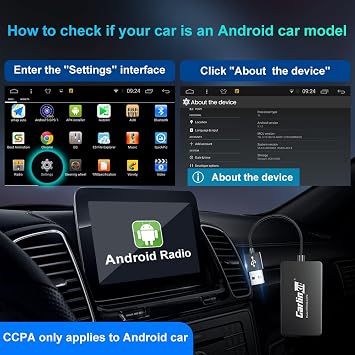
Carlinkit Wireless CarPlay USB Adapter Only Compatible with Android car radios. only for Android Version 4.4.2 or Above. APK Must be Successfully
Item #:
51179036
USD 74
Price Details
Excluding Shipping & Custom charges ( Shipping and custom charges will be calculated on checkout )
*All items will import from US
In stock
 Imported from USA store
QTY:
Only 10 items left in stock.
Order now and get it around Thursday, July 30
Secured transaction
Ubuy works hard to protect your security and privacy. Our advanced payment security system ensures confidentiality by encrypting your information during transmission using AES (Advanced Encryption Standards) and SSL (Secure Socket Layer) protocols. Your payment details are 100% secure as we do not share your payment details with third party sellers.
Our Top Logistics Partners


Upgrade your Android car radio with wireless CarPlay/Android Auto and turn your car radio into a mobile phone.

Fast
Shipping

Free
Return*

Secure Packaging

100% Original Products

PCI DSS Compliance

ISO 27001 Certified


What Stands Out
Wireless Connectivity
Experience seamless wireless CarPlay with the Carlinkit adapter, letting you connect your smartphone effortlessly without the hassle of cables.
Android Compatibility
Designed specifically for Android car radios, ensuring optimal performance and functionality for devices running Android version 4.4.2 or higher.
Easy Setup
Simple installation process requires APK installation beforehand, allowing users to enjoy wireless CarPlay with minimal effort and maximum convenience.
Product Details
- CarlinKit Wireless CarPlay USB Adapter for Android car radios with Android System 4.4.2 or above
- Wired to wireless adapter for Android car radios
- Easy installation - APK must be successfully installed before using USB
- Supports wired CarPlay to wireless CarPlay and wired Android Auto to wireless Android Auto
- Fast and seamless connectivity with 5Ghz WiFi transfer rate
- Compact and refined appearance for a sleek look
| Compatible Devices | Smartphone |
| Connector Type | USB |
| Number of Ports | 1 |
| Power Plug Type | No Plug |
| Smart Home Compatibility | Not Smart Home Compatible |
| Color | Black |
| Item Dimensions | 7.01 x 0.51 x 1.57 inches (17.8 x 1.3 x 4 cm) |
| Item Weight | 34 Grams |
| Unit Count | 1.0 Count |
| Number of Items | 1 |
| Brand | Carlinkit |
| Model Number | CPC200-CCPA |
| Manufacturer | Carlinkit |
| Mfr Part Number | CPC200-CCPA |
| Item dimensions L x W x H | 7.01 x 0.51 x 1.57 inches (17.8 x 1.3 x 4 cm) |
Who Should Buy?

-
Android Users
Ideal for Android smartphone users wanting seamless wireless CarPlay functionality in compatible vehicles.
-
Tech Enthusiasts
Great for users who enjoy the latest tech and want to enhance their in-car experience with wireless connectivity.
-
Frequent Travelers
Benefits drivers who spend a lot of time in their vehicles, allowing for hands-free navigation and calls.

-
iPhone Users
Not suitable for iPhone users as it only supports Android devices with specific compatibility requirements.
-
Older Android Versions
Users with Android versions below 4.4.2 will find this product incompatible and unusable.
-
Inexperienced Users
May not be ideal for those unfamiliar with technology, as initial APK installation could be challenging.
Product Description
Have any Query? Chat with us
Customer Questions & Answers
-
Question:
What is the CarlinKit Wireless CarPlay USB Adapter compatible with?
Answer: The CarlinKit Wireless CarPlay USB Adapter is specifically designed for Android car radios that operate on Android version 4.4.2 or above. This ensures that users can fully utilize the features of CarPlay wirelessly, enhancing their in-car experience. It's important to verify compatibility with your car's system prior to purchase, especially if your vehicle has specific installation requirements. For example, if you're driving a newer vehicle with Android integration, this adapter will allow you to seamlessly connect your smartphone for hands-free navigation, music, and communication. -
Question:
How do I connect the CarlinKit Wireless CarPlay USB Adapter to my Android car radio?
Answer: Connecting the CarlinKit Wireless CarPlay USB Adapter is a straightforward process. First, you need to plug the adapter into your car's USB port and ensure your vehicle is turned on. Then, connect to the adapter via Bluetooth or Wi-Fi from your Android device. Once connected, you can access CarPlay features directly through your car's display. Remember, your phone should have the necessary app installed, and it's beneficial to refer to the user manual for your adapter for precise setup instructions and troubleshooting tips. -
Question:
Can I use the CarlinKit adapter with any Android phone?
Answer: Yes, the CarlinKit Wireless CarPlay USB Adapter is compatible with Android phones running version 4.4.2 or higher. This means you can enjoy wireless CarPlay functionality with most modern devices. It's perfect for users looking to transform their existing car audio systems into smart devices. For instance, using it allows you to make phone calls, send messages, and utilize navigation apps without needing to handle your device directly, ensuring a safer driving experience. -
Question:
What features does the CarlinKit Wireless CarPlay USB Adapter support?
Answer: The CarlinKit Wireless CarPlay USB Adapter supports a range of features, including hands-free calling, voice control, navigation, music streaming, and access to third-party applications. This adapter enhances the driving experience by allowing users to manage their smartphones from their car’s interface. For example, you can easily play your favorite playlists or get directions using voice commands, which helps keep your focus on the road while still enjoying modern technology. -
Question:
Is there an app required for the CarlinKit Wireless CarPlay USB Adapter?
Answer: Yes, to use the CarlinKit Wireless CarPlay USB Adapter, you'll need to ensure that a specific application compatible with the adapter is successfully installed on your Android device. This app facilitates the connection and functionality of the adapter with your car radio. You can typically find the required app on the Google Play Store. Following installation, the app will guide you through configuring the settings for optimal use, ensuring a smooth and user-friendly experience. -
Question:
Are there any additional requirements for using the CarlinKit adapter?
Answer: Yes, to fully utilize the CarlinKit Wireless CarPlay USB Adapter, your car radio must be compatible with the adapter, specifically running on Android version 4.4.2 or above. Additionally, having a stable internet connection on your Android device may enhance performance for streaming music or navigation. It's also recommended that your car’s firmware is up to date for the best compatibility and functionality. These requirements ensure a seamless integration of mobile features into your driving experience. -
Question:
How do I troubleshoot issues with my CarlinKit adapter?
Answer: If you encounter issues with your CarlinKit Wireless CarPlay USB Adapter, first ensure that it is securely connected to the car's USB port. Next, check that your Android device meets the required OS version and that any necessary applications are installed correctly. If problems persist, restarting both the adapter and your device often resolves connectivity issues. Additionally, consulting the user manual for troubleshooting tips or checking the manufacturer's website for updates and support can provide further assistance. -
Question:
Can I use the CarlinKit adapter without a data plan?
Answer: Yes, you can use the CarlinKit Wireless CarPlay USB Adapter without a data plan, as it enables access to offline content stored on your device. You can still use features like music playback, phone calls, and navigation that don’t require continuous internet access. However, for real-time updates such as traffic navigation or online streaming services, a data connection is needed. This feature is particularly beneficial for users who prefer downloading music or maps in advance, reducing the need for constant internet connectivity. -
Question:
Where can I buy the CarlinKit Wireless CarPlay USB Adapter?
Answer: You can buy the CarlinKit Wireless CarPlay USB Adapter from Ubuy. This platform offers a variety of electronic gadgets including the CarlinKit adapter, ensuring a reliable purchasing experience. By shopping on Ubuy, you gain access to a wide selection of products along with customer reviews and ratings which can help in making informed decisions. Simply search for the product on Ubuy's website and enjoy seamless shopping. -
Question:
What should I do if my car radio does not recognize the CarlinKit adapter?
Answer: If your car radio does not recognize the CarlinKit Wireless CarPlay USB Adapter, start by checking the USB connection to make sure it is firmly inserted. Next, ensure that your Android device is set to the correct mode for connection and that its Bluetooth is enabled. Restarting both your car radio and smartphone can also help refresh the connection. If the issue remains, referring to the troubleshooting guidelines in the user manual or reaching out to customer support for assistance may be necessary.
Carlinkit Auxiliary Input Adapters CPC200-CCPA Editorial Review




No editorial reviews found
Customer Reviews & Ratings
126 customers ratings
-
5 Star
57%
-
4 Star
13%
-
3 Star
4%
-
2 Star
12%
-
1 Star
14%
Review this product
Share your thoughts with other customers
Platform Trust & Buyer Confidence

MT
Mohd
Verified buyer
“The product received very good packaging & safe…Thank You”
16 June 2026 · via Trustpilot
SJ
Shawati
Verified buyer
“Accurate delivery timing given”
16 June 2026 · via Trustpilot
YB
Youcef
Verified buyer
“Not madly expensive like I thought, and much quicker than promised.”
15 June 2026 · via Trustpilot
LM
Leila
Verified buyer
“Never dealt with Ubuy before, but everything worked out great. Seamless cross border purchasing and shipping. Thanks!”
6/7/2026 · via Trustpilot
KA
Kwame
Verified buyer
“The process was smooth, with clear communication and timelines. This was my 1st purchase and I am really impressed. I will definitely be coming back.”
12 June 2026 · via Trustpilot
Secure Checkout
Global Delivery
Easy Returns
Genuine Products
Product Price History
Important information
- Limitations : For products shipped internationally, please note that any manufacturer warranty may not be valid; manufacturer service options may not be available; product manuals, instructions, and safety warnings may not be in destination country languages; the products (and accompanying materials) may not be designed in accordance with destination country standards, specifications, and labeling requirements; and the products may not conform to destination country voltage and other electrical standards (requiring use of an adapter or converter if appropriate). The recipient is responsible for assuring that the product can be lawfully imported to the destination country. When ordering from Ubuy or its affiliates, the recipient is the importer of record and must comply with all laws and regulations of the destination country.
- Not all the products listed on Ubuy are for sale, as Ubuy is a global search engine. Products are subject to export/trade regulations.
USD 74
Order now and get it around Thursday, July 30
This item is not restrict in my country.(Please click on above link if this item is not restrict in your country, So our team will review and allow.)
QTY:
Only 10 items left in stock.
Secured transaction
PCI DSS compliant and ISO 27001:2022 certified, with encrypted payments and full buyer protection on every order.
Our Top Logistics Partners
Fastest cross-border delivery
Features & Benefits
- Compatible with Android System 4.4.2 or above
- Two ways to install the APK
- Works with Android and iPhone
- Can be used for Wireless CarPlay, Wireless Android Auto and Wired Apple Mirror Connection
- Insert the device and pair it with your phone to get started.
Ubuy Assurance
Experience worry-free shopping with 100% original products, PCI DSS-compliant payment security, ISO 27001-certified data protection, the fastest cross-border delivery, free returns *, and secure packaging on every order.